> ## Documentation Index
> Fetch the complete documentation index at: https://docs.li.fi/llms.txt
> Use this file to discover all available pages before exploring further.
# 组件盈利
> 了解如何配置费用并实现 LI.FI 组件集成的盈利。
有关费用如何工作、不同链上的费用收集以及设置费用钱包的更多详细信息,请参见[集成盈利](/introduction/integrating-lifi/monetizing-integration)指南。
在组件中配置费用有两种方式:用于基本用例的简单 `fee` 属性,或提供更多灵活性和自定义选项的高级 `feeConfig` 配置。
### 简单费用配置
```JavaScript theme={"system"}
import { LiFiWidget, WidgetConfig } from '@lifi/widget';
const widgetConfig: WidgetConfig = {
// 设置费用参数为 3%
fee: 0.03,
// 其他选项...
};
export const WidgetPage = () => {
return (
);
};
```
### Advanced fee configuration
For more advanced use cases, you can use the `feeConfig` parameter which provides additional customization options:
```JavaScript theme={"system"}
import { LiFiWidget, WidgetConfig, WidgetFeeConfig } from '@lifi/widget';
// Basic advanced configuration
const basicFeeConfig: WidgetFeeConfig = {
name: "DApp fee",
logoURI: "https://yourdapp.com/logo.png",
fee: 0.01, // 1% fee
showFeePercentage: true,
showFeeTooltip: true
};
// Dynamic fee calculation
const dynamicFeeConfig: WidgetFeeConfig = {
name: "DApp fee",
logoURI: "https://yourdapp.com/logo.png",
showFeePercentage: true,
showFeeTooltip: true,
calculateFee: async (params) => {
// Custom logic to calculate fees based on token, amount, etc.
const { fromTokenAddress, toTokenAddress, fromAmount } = params;
// Example: Different fees for different token pairs
if (fromTokenAddress === "0x..." && toTokenAddress === "0x...") {
return 0.02; // 2% for specific pair
}
// Example: Volume-based fee structure
if (parseFloat(fromAmount) > 1000) {
return 0.015; // 1.5% for large volumes
}
return 0.03; // Default 3% fee
}
};
const widgetConfig: WidgetConfig = {
feeConfig: basicFeeConfig, // or dynamicFeeConfig
// Other options...
};
export const WidgetPage = () => {
return (
);
};
```
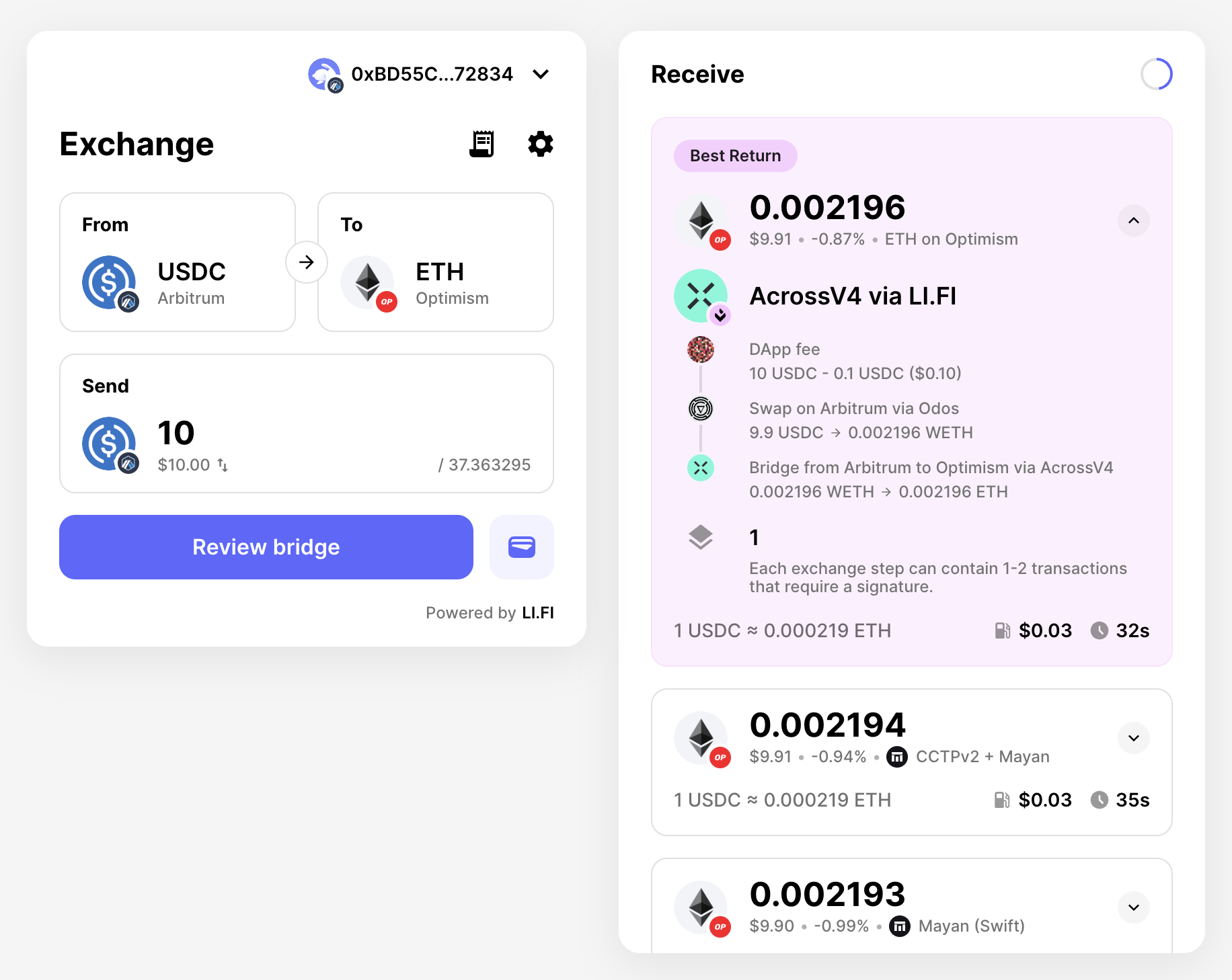 ### WidgetFeeConfig interface
The `WidgetFeeConfig` interface provides the following options:
* **`name`** (optional): Display name for your integration shown in fee details
* **`logoURI`** (optional): URL to your logo displayed alongside fee information
* **`fee`** (optional): Fixed fee percentage (e.g., 0.03 for 3%)
* **`showFeePercentage`** (default: false): Whether to display the fee percentage 中 UI
* **`showFeeTooltip`** (default: false): Whether to show a tooltip with fee details (requires `name` or `feeTooltipComponent`)
* **`feeTooltipComponent`** (optional): Custom React component for the fee tooltip
* **`calculateFee`** (optional): Function for dynamic fee calculation based on transaction parameters
Only use either `fee` or `calculateFee` - not both. The `calculateFee`
function allows for dynamic fee calculation based on factors like token pairs,
transaction amounts, user tiers, or any other custom logic.
### WidgetFeeConfig interface
The `WidgetFeeConfig` interface provides the following options:
* **`name`** (optional): Display name for your integration shown in fee details
* **`logoURI`** (optional): URL to your logo displayed alongside fee information
* **`fee`** (optional): Fixed fee percentage (e.g., 0.03 for 3%)
* **`showFeePercentage`** (default: false): Whether to display the fee percentage 中 UI
* **`showFeeTooltip`** (default: false): Whether to show a tooltip with fee details (requires `name` or `feeTooltipComponent`)
* **`feeTooltipComponent`** (optional): Custom React component for the fee tooltip
* **`calculateFee`** (optional): Function for dynamic fee calculation based on transaction parameters
Only use either `fee` or `calculateFee` - not both. The `calculateFee`
function allows for dynamic fee calculation based on factors like token pairs,
transaction amounts, user tiers, or any other custom logic.