

Step 1: Account Creation & Identity
Currently, solver identity is managed through a standalone dashboard.- Register: Go to the Solver UI: intents.li.fi (or devintents.li.fi for testnet).
- Set Identity: Choose a Solver Name. This is a permanent identifier used for your API keys and reputation tracking.
- Generate API Keys: Create an API key in the dashboard. You will need this to submit quotes to the
/quotes/submitendpoint.
Step 2: Address Registration
You must prove ownership of the wallet addresses you will use to fill intents.- Sign Message: Use your solver wallet to sign the registration message provided by the Order Server (supports ECDSA or EIP-1271).
- Submit Pairing: Send the signature and address to the registration endpoint:
Each address can only be tied to one API key. If it is not possible to sign messages from your solver, the LI.FI team can manually add a solver address.
Step 3: Testnet/Mainnet Testing (ExclusiveFor Mode)
Before being whitelisted for the LI.FI API, you must prove your execution logic works on mainnet. You can test using either the Lintent UI or the LI.FI Intents MCP Server — both are equally valid approaches.- Lintent UI
- LI.FI Intents MCP Server
Manual Testing via Lintent
- Open Lintent: Go to lintent.org.
- Configure Intent: Set up a swap/bridge intent. Use “Escrow” input instead of “The Compact”.
- Set Exclusivity: Manually enter your registered solver address into the
exclusiveForfield. This ensures only your solver can fill this specific intent. - Execute: Issue the intent and verify that your solver picks up the quote and completes the fill.
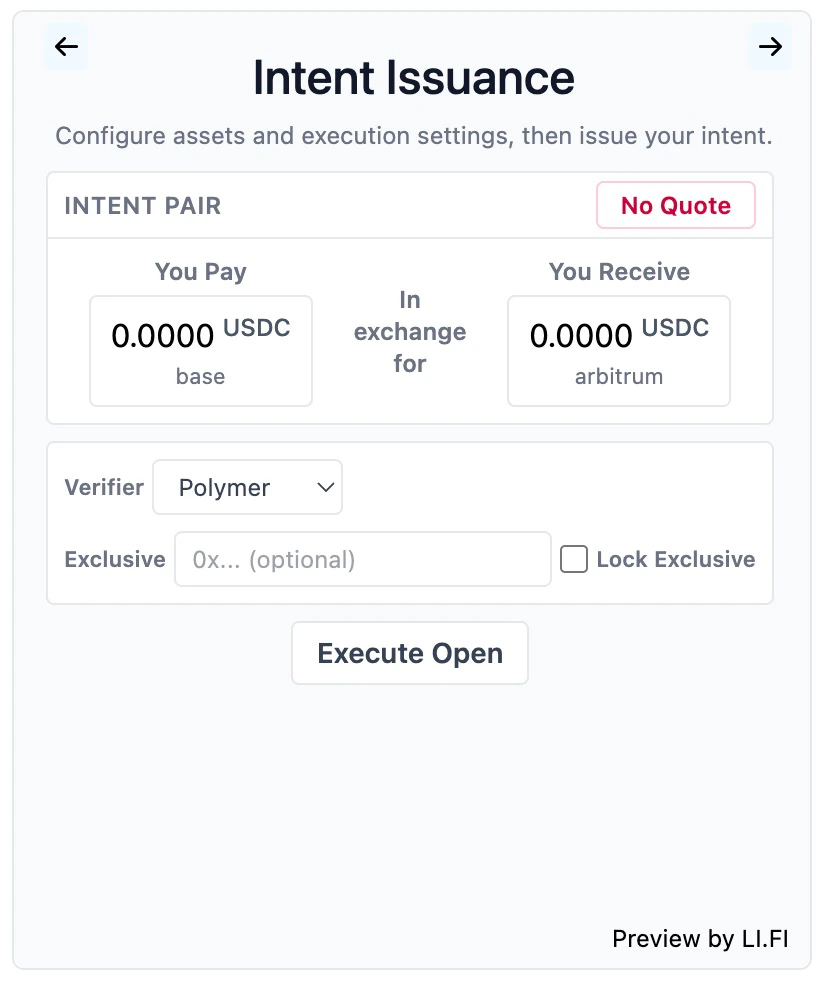
Lintent UI with the exclusiveFor field set to your solver address